


Paint Loop: Pixel Puzzle
4.7217.00 Reviews
App Specs
- Version
- 1.001
- Updated On
- License
- Free
- Downloads
- 50,000+
- Developer
- Unico Games Studio
- Categories
- Puzzle
- Platform
- Android
Screenshots
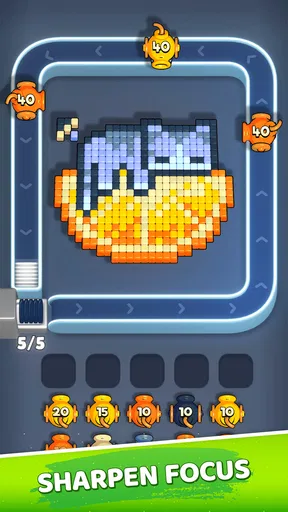

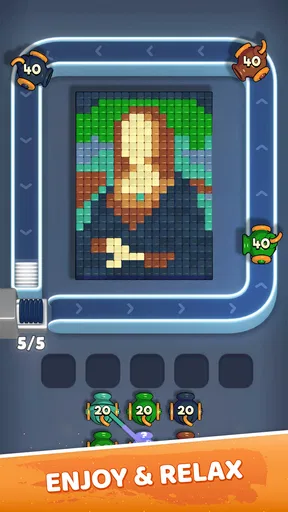
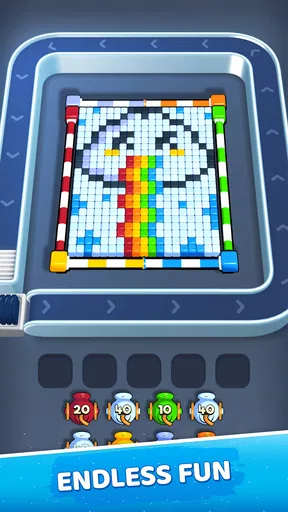
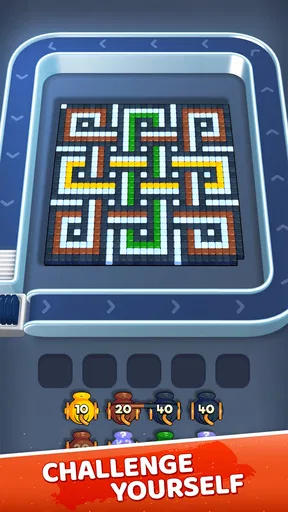

 Analysis by AppCompare
I approached Paint Loop: Pixel Puzzle as a quick puzzle game rather than something designed for long, uninterrupted sessions. That distinction matters. Its appeal is built around sorting under pressure, keeping your attention on the screen, and reacting before a small mistake turns into a failed attempt. After spending time with it, I found the experience easiest to appreciate when I treated each round as a short concentration exercise instead of expecting a large adventure, story, or deep strategy campaign.
The game comes from Unico Games Studio and sits in the puzzle category. It is free to download, with optional purchases ranging from $1.99 to $89.99 per item. That makes the initial decision simple, but the longer-term decision deserves more thought: you can try the core experience without paying, yet anyone who dislikes purchase prompts or prefers a completely self-contained puzzle game should pay attention to how the free version fits their habits.
How I Would Decide Whether Paint Loop Fits You
My first test for a game like this is not visual polish; it is whether the basic action remains satisfying after the novelty fades. In this case, the central loop is easy to understand. You sort elements while trying to maintain speed and concentration, and the pressure comes from having to identify the right move quickly rather than slowly planning every possibility. That makes it approachable for people who want to start playing immediately.
The second question is how much mental intensity you want. This is not the kind of puzzle I would choose when I want to relax with no time pressure at all. Even when the rules feel familiar, the need to stay alert changes the mood. I found it better suited to a short break, a commute, or a few minutes between tasks than to a quiet evening spent solving elaborate logic problems.
A third consideration is tolerance for repetition. Fast sorting games can be enjoyable because the action is direct, but their appeal depends on how much satisfaction you get from improving your own timing and focus. If you need a new story beat, a large collection of different puzzle rules, or a strong sense of exploration in every session, this may feel narrower than other puzzle games.
The game has an average rating of 4.7 from around 1.9 thousand ratings, while its review count is a little over two hundred. I read that as a positive sign of early player approval, but not as a guarantee that every type of puzzle fan will enjoy it. A high average can show that the main loop works for its intended audience; it does not remove the importance of matching the game to your preferred pace.
The strongest reason to choose it
What I like most is the low barrier between opening the game and understanding what I should do. There is no need to learn a complicated control scheme before the puzzle becomes meaningful. That is useful when I have only a few minutes and do not want to remember a large set of rules from a previous session.
Worth Reading Before You Choose

Flipboard Shows What News Apps Must Do Beyond the Feed

Switching to Android Auto Means Rethinking Your Driving Routine

Google Calendar Makes a Crowded Week Easier to Manage

Ludo King Makes the Most of the Minutes Between Plans

Baby Panda World Brings Quick Play to Modern Phones, but Its Game Library Feels Busy

ESPN’s Live Game View Makes Following Close Games Easier
The quick format also gives the game a practical advantage over slower puzzle alternatives. I can play while waiting for an appointment or during a short pause without feeling that I am abandoning a long level halfway through. For a phone game, that kind of flexibility is more important than it sounds. A title can be clever and still be inconvenient if every session demands a large block of uninterrupted time.
The focus requirement is another genuine strength. The game rewards more than simply recognizing a matching action; it asks me to keep track of what is happening while resisting rushed decisions. That creates a small but useful distinction between casual tapping and attentive play. When I play carefully, I notice that speed is only part of the challenge. Consistency matters too.
Three practical ways to get more from each session
My first useful habit was to avoid treating every move as an emergency. The fast pace encourages immediate reactions, but taking a brief moment to scan the available choices can prevent a chain of hurried errors. I still move quickly, but I try to identify the next likely action before committing to the current one. That approach makes the game feel less random and more like a test of visual organization.
Second, I would use it as a reset between demanding tasks rather than as background entertainment. Because the game asks for active attention, it can work as a clean break from reading, messaging, or work. I would not play while walking, crossing a street, or doing anything that requires awareness elsewhere. The same focus that makes the game engaging also means it is not ideal for distracted play.
Third, I found it more useful to judge progress by fewer mistakes and steadier decisions instead of chasing speed alone. Fast inputs are tempting, but a slightly slower rhythm that keeps the board under control can be more satisfying. This is a non-obvious trade-off: the game appears to reward reflexes, yet disciplined observation can be just as important as raw reaction time.
These habits also help answer a common concern about short puzzle games: whether they offer anything beyond a first impression. The answer depends on the player. If you enjoy refining a repeated skill, the sorting loop can remain worthwhile. If you expect a constant stream of new mechanics, the same simplicity may become a limitation.
What the current version means for installation
The current version is 1.001, and it requires Android 6.0 or later. That makes it accessible to people using older compatible Android devices, although the actual comfort of play will still depend on the phone’s screen, responsiveness, and how easily you can make quick selections.
Paint Loop: Pixel Puzzle has passed 50 thousand installs, which gives it a real player base without placing it among the enormous mainstream mobile titles. I would see that as enough interest to justify trying it, especially because the download itself is free. The age rating is Everyone, so it is positioned as a broadly accessible game rather than one aimed at a mature audience.
Still, “Everyone” should not be confused with “perfect for every situation.” Younger players may enjoy the simple goal, while older players may appreciate the concentration challenge, but anyone sensitive to fast visual pressure may prefer a slower puzzle format. Parents should also remember that optional purchases are present, even though the game can be installed without an upfront price.
Where Other Puzzle Styles May Be a Better Fit
The most important limitation is that Paint Loop is built around speed and focus. If I want a calm experience where I can pause for several minutes to test a solution, I would choose a traditional logic puzzle instead. Number puzzles, word puzzles, and tile games often give me more time to reason, while this game places more value on immediate recognition and controlled reactions.
It is also not the best choice for someone seeking a narrative puzzle adventure. There is no reason to approach it expecting characters, exploration, or story-based progression. Its identity comes from the act of sorting, so comparing it with a story-driven mystery game would be unfair but useful: the two serve completely different moods.
Players who prefer competitive depth may also want another category. A strategy puzzle can reward planning several turns ahead, while this experience is more about what I can notice and execute in the moment. That makes it easier to pick up, but potentially less appealing to someone who wants a complex system to study over many weeks.
There is a similar trade-off with offline-style casual games in general. A compact sorting game is convenient because it does not demand much commitment, but convenience can come at the cost of variety. If your ideal phone game is something you can play for an hour without seeing the same basic type of challenge, I would compare it with a larger puzzle collection before settling here.
Free entry, optional spending, and the cost of switching
The free starting point is one of the clearest advantages. I can install the game, learn its rhythm, and decide whether the repeated sorting challenge suits me before spending anything. That is a better arrangement for uncertain players than paying immediately for a puzzle game that may not match their preferred pace.
The optional purchase range is wide, however, with individual items priced from $1.99 up to $89.99. I would treat that as a reason to establish a personal spending boundary before making any purchase. The low end may feel manageable, but the presence of a much higher-priced item means I would not tap through a purchase screen casually or assume every option has the same value.
This is where the cost of switching becomes important. If you later decide that a slower or more varied puzzle game suits you better, the main thing you lose is familiarity with Paint Loop’s timing and sorting rhythm. Because the game is free to try, that switch is relatively easy if you have not spent money. If you purchase items early and then discover that the core loop is not for you, the decision becomes less comfortable.
My advice is to play long enough to answer three personal questions before buying anything: Do I enjoy the pressure rather than merely tolerate it? Do I want to improve at this exact style of sorting? And would I still open it during an ordinary week, not just on the first day? Those questions are more useful than assuming extra spending will solve a mismatch in gameplay style.
A realistic everyday scenario
Imagine waiting for a train with eight minutes to spare. I would choose this game over a large role-playing title because I can begin immediately and give it my full attention without needing to remember a complicated quest. I could play a short session, put the phone away, and return later without feeling that I had interrupted an important story moment.
Now imagine the same game being used during a noisy lunch break while answering messages. In that setting, I would probably skip it. The challenge depends on concentration, and divided attention turns a quick puzzle into a frustrating sequence of avoidable mistakes. A slower game that allows pauses would be the better alternative there.
That contrast captures the product’s real place on my phone. It is not simply “a game for spare time”; it is a game for spare time when I am willing to focus. That makes it more purposeful than many passive time-fillers, but less flexible than puzzles that can be played casually while multitasking.
Who should install it, and who should pass?
I would recommend trying it if you like short, responsive puzzle sessions and enjoy measuring improvement through cleaner decisions. It is especially suitable for players who want a straightforward challenge that tests attention without requiring a long tutorial or a large fictional world. The free entry point makes experimentation easy.
I would be more cautious if you dislike time pressure, become annoyed by repeated attempts, or want every session to introduce a radically different puzzle idea. People who prefer contemplative logic, wordplay, construction, or story-led challenges will probably find better matches elsewhere. The same focused simplicity that helps Paint Loop feel accessible may make it feel limited to those players.
I would also skip it if optional purchases are a major concern and you prefer games with no spending layer at all. The game is free, but the listed purchase range means I would approach it with the same awareness I use for any free-to-start title. Install it for the gameplay first, not because you expect purchases to transform it into a different kind of puzzle.
My recommendation after weighing the trade-offs
Paint Loop: Pixel Puzzle is worth trying when you want a focused, fast puzzle break rather than a deep campaign. I like its direct rules, its suitability for short sessions, and the way it turns sorting into a test of attention instead of a purely passive activity. The developer has chosen a narrow idea, and that focus is both its strongest quality and its clearest limitation.
My recommendation is strongest for casual puzzle players who enjoy improving their timing and staying mentally present for a few minutes at a time. I would start with the free version, play without rushing into optional purchases, and see whether the rhythm feels satisfying after the first impression wears off. If it does, the game can earn a regular place in a short-break routine.
If your priority is calm reasoning, rich variety, or a story that carries you from one puzzle to the next, I would choose another category instead. Paint Loop does not need to serve every puzzle preference. For the right player, its compact sorting challenge is enough; for everyone else, the free download makes finding that out relatively painless.
Overall, I see it as a focused Android puzzle option with a clear use case: quick sessions that demand speed, concentration, and controlled reactions. Its 4.7 average and growing player audience suggest that the central idea is connecting with people, but my final advice remains personal rather than numerical. Try it when you want active engagement in a small package, and move on without guilt if you were really looking for a slower, broader, or more story-driven experience.
Pros
- Simple drag-and-drop controls make it easy to start playing.
- Short levels are convenient for quick breaks or casual sessions.
- Pixel-art visuals are colorful
- clear
- and pleasant to look at.
- Puzzle difficulty gradually increases as new patterns become harder.
- Offline play is useful when you have limited or no internet access.
Cons
- Some levels may feel repetitive after extended play sessions.
- Hints or extra moves may be limited unless you watch advertisements.
- Ads can interrupt the experience between puzzles.
- The game offers little narrative or variety beyond its core puzzle mechanic.
- Small pixel sections may be difficult to distinguish on compact screens.
FAQs for Paint Loop: Pixel Puzzle
What is Paint Loop: Pixel Puzzle, and how is the game played?
Paint Loop: Pixel Puzzle is a casual puzzle game built around arranging and completing colorful pixel-style patterns. Each level generally asks you to place, rotate, or organize visual pieces until the image or loop is correctly formed. The controls are easy to understand, making it suitable for short sessions, although later puzzles require more observation, patience, and careful planning rather than fast reflexes.
Is Paint Loop: Pixel Puzzle free to download and play?
The game can typically be downloaded for free, allowing players to try its core puzzles without paying upfront. However, free mobile games may include advertising, optional purchases, or both. These can be used for hints, extra assistance, or other convenience features, depending on the version available in your region. Always check the store listing for the latest pricing and purchase details.
Does Paint Loop: Pixel Puzzle require an internet connection?
Many puzzle levels can usually be enjoyed without a constant internet connection, which makes Paint Loop: Pixel Puzzle convenient for travel, waiting rooms, or other offline situations. Nevertheless, internet access may be needed for advertisements, restoring purchases, downloading updates, or accessing certain online features. Because requirements can change between releases, it is best to test the game after installation before relying on it offline.
Is Paint Loop: Pixel Puzzle suitable for children and casual players?
Paint Loop: Pixel Puzzle is generally approachable for casual players because its visual presentation and basic interactions are simple to learn. It does not depend on complex controls or rapid action, so children and adults can both understand the main concept quickly. Parents should still review the age rating, advertising, in-app purchase options, and privacy information before allowing younger children to play independently.
Are there hints, difficult levels, or any limitations I should know about?
The early stages are designed to introduce the puzzle mechanics gradually, while later challenges can become more demanding as patterns grow more complex or solutions become less obvious. If the game provides hints, they may be limited or connected to advertisements or optional purchases. Players who prefer deep strategy may find the experience relatively simple, but it works well for relaxing, bite-sized puzzle sessions.


